Developer Workflow10 min read
The Six Claude Code Skills I’d Reach For on Real Projects
Claude Code is a strong coding assistant, but real projects expose the same weak points every time. These are the six skills I’d set up first, and the workflow problem each one solves.
Claude Code is good at the mechanics: writing code, reading a repository, running commands, working through an implementation. The trouble starts once a project grows past a single session. The same weak points show up every time. It starts editing before it understands the task, long sessions fill up with noise, it forgets what you decided yesterday, and a clean-looking diff ships with an unhandled edge case. The model is smart enough. These are workflow problems, and skills are how you fix workflow problems.
I think of a skill as a reusable process with a clear trigger, a clear job, and a clear output. It records how you want a kind of work done, so you don't have to explain it again every session. Here are the six I'd install or build first, along with the failure each one is meant to prevent.
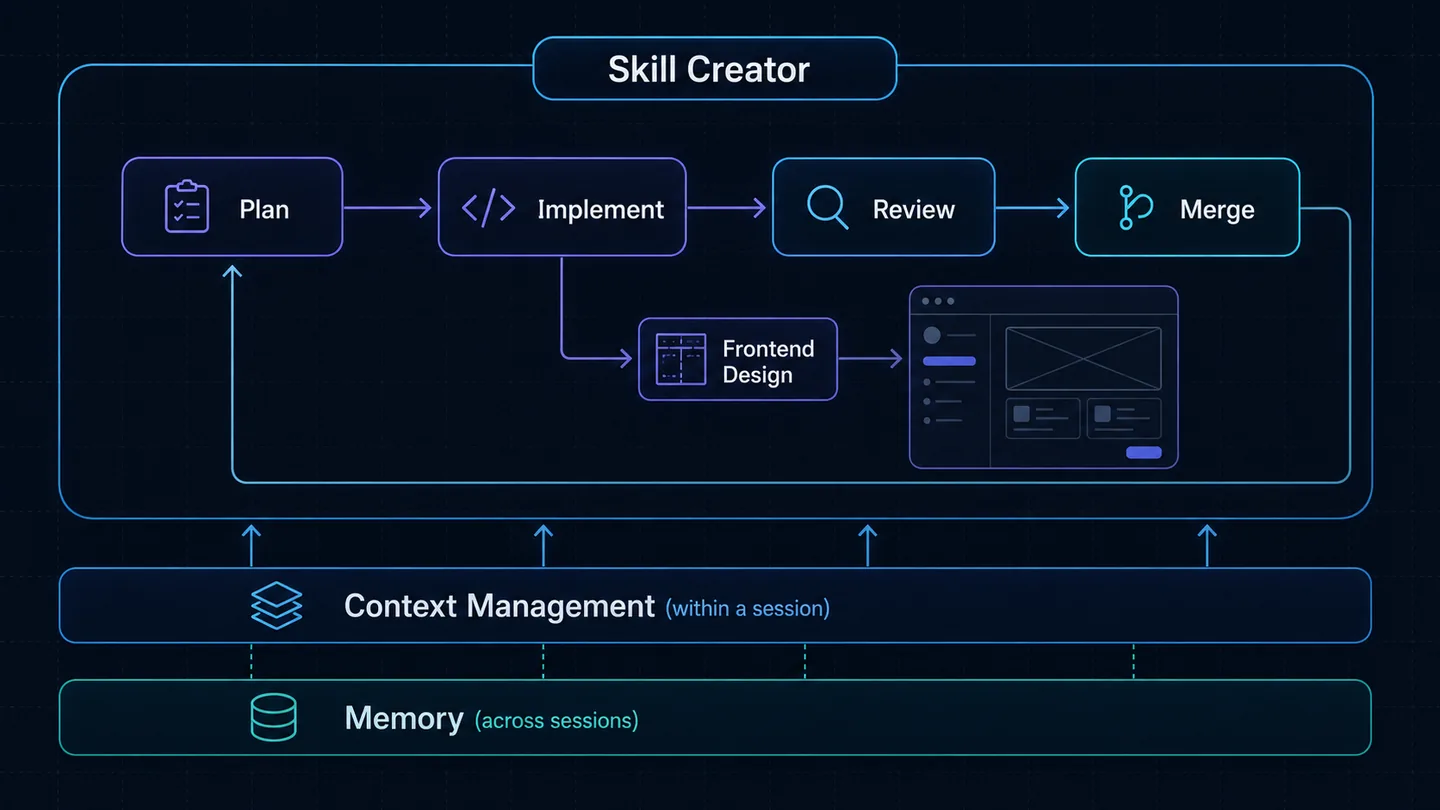
1. Skill Creator: turn repeated prompts into process
The first skill I'd set up is the one that builds the others. That sounds minor until you notice how much real work is repetition. You review similar files, follow the same conventions, apply the same testing strategy, and type the same long instructions over and over. Doing that by hand means rewriting the same prompt every time and forgetting a different line of it each time.
My rule: when I catch myself writing the same prompt for the third time, it should be a skill. Skill Creator closes the gap between "I know how I want this done" and "it gets done that way every time." You describe the process in plain language (a checklist, an SOP, even a messy prompt you already rely on) and it becomes a structured skill that triggers on its own. A review checklist stops being something I have to remember and becomes part of the process.
Here's one I keep in every backend repo, for reviewing endpoints before merge:
---
name: review-api-endpoint
description: Review a new or changed API endpoint before merge (validation, auth, errors, tests, docs).
---

When an endpoint is added or modified, check, in order:
1. Input validation: every field, including the missing and malformed cases.
2. Authorization: the right permission layer runs *before* any data access.
3. Error handling: no internal errors or stack traces leak to the client.
4. Tests: success, failure, and at least one auth-denied case.
5. Docs: the API reference is updated whenever the contract changes.
The mistake to avoid is building skills too early. A good candidate is repeated, structured, and important enough that consistency matters. If the task is vague or different every time, leave it as a prompt. Start with one workflow you really do repeat, like a review checklist, a testing flow, or a routine for getting oriented in a new codebase. Use it on a real task, fix it where it fails, and only then build the next one.
Encode the processes you repeat; leave the one-offs as prompts.
2. Planning: stop coding too early
Claude Code is excellent when the task is clear, the structure is understood, and the path is defined. The problem is that most tasks don't arrive that way. They start as a rough request, a bug report, or a one-line feature that hides a dozen technical decisions. Let implementation begin before discovery and you get code that looks reasonable but misses an edge case, ignores an existing abstraction, or solves the visible half of the problem.
A planning skill turns "start editing now" into "understand the task, inspect the codebase, propose a plan, then implement." A good one forces a few things before any file changes: restate the task concretely, inspect the relevant code instead of guessing from the open file, list the files that will change and why, propose the approach, and define how the change gets tested. That last point is where most AI coding workflows go wrong. They implement first and never plan how to verify it.
What you get is a checkpoint. Instead of "add role-based access control," you ask it to first map how auth works today (middleware, route handlers, models, existing permission checks), then propose where the role logic should live and which tests prove it works. You correct the plan before it turns into a large diff. That step pays off most in the parts of a system you can't afford to rush: auth, billing, permissions, migrations, background jobs.
Keep the balance. A typo fix or a constant change doesn't need a plan; forcing one just slows you down. Reach for planning when the task carries uncertainty, touches multiple files, affects core behavior, or needs tests.
Plan when a wrong implementation costs more than a few minutes of inspection up front.
3. Context Management: keep long sessions usable
In short sessions you never think about context. In long ones, like debugging, browser automation, repeated test runs, or multi-file changes, it fills up with output that's only partly useful. A stack trace has one useful line and a hundred that don't matter. A test run buries one failing assertion under fixtures and warnings. Dump all of it into the conversation as-is and the model ends up reasoning in a workspace that gets noisier with every loop.
This matters because Claude Code works in feedback loops: read, edit, run, read the error, edit again. Each loop adds more raw output. Without a clean working state, it starts chasing an error that's already fixed, redoing finished steps, or working from a stale snapshot of the page. When a long session starts going sideways, it's usually the workspace that has degraded, not the model.
A context-management skill does three things. It compresses noisy tool output into useful summaries. It preserves the working state: files changed, decisions made, errors still open, next step. And it makes recovery easy after the conversation gets long or gets compacted. When I'm debugging a flaky Playwright test, it keeps "what changed, what failed, what's confirmed, likely next cause" instead of pasting yet another full accessibility snapshot. The raw output is still there if the model needs the detail, but only the summary stays in the active context. The result is a session you can actually supervise.
You won't need it for a copy change or a one-function edit. You'll want it for long debugging, browser-based testing, multi-file refactors, and anything with repeated command output.
Keep changed files, current errors, decisions, and next actions in context, and keep the raw output out of the way.
4. Memory: carry the project across sessions
Context management keeps the current session focused. Memory carries useful project knowledge into the next one. Real work rarely happens in one sitting. You build a feature today, fix related bugs tomorrow, come back in two weeks, and switch between client repos in between. Without memory, every session pays the same tax: re-explain the project, recap what's done, point at the important files, and reconstruct yesterday's decisions.
Projects hold a lot of knowledge the code alone doesn't explain: architecture decisions, rejected approaches, setup notes, test commands, deployment constraints, naming conventions, unfinished work. Inspection tells you what the code is, not why it's shaped that way or what happened last session. Memory fills that gap. The best framing I've found is a project handoff: at the end of a useful session, it records what changed, what was decided, what still fails, and what to check next; at the start of the next, it retrieves the relevant parts.
One rule keeps memory safe: never treat it as automatically correct. Files get renamed,
decisions change, commands stop working. Good memory is selective, easy to inspect, and checked
against the live repo before anyone trusts it. If memory says auth lives in middleware/auth.py,
the model still opens the file before editing. Bad memory quietly steers the model wrong, which is
why being able to see what it remembers matters more than having it remember everything.
Skip it for a quick edit in a small script. It earns its place when a project runs across days or weeks, carries real conventions, or has several features in flight at once.
Remember the decisions and the open work, then check the memory against the codebase before relying on it.
5. Review: treat the generated code as a draft
Generated code shouldn't count as final just because it arrived quickly or the first test passed. Claude Code writes useful implementations, and it also misses edge cases, makes silent assumptions, and ships changes that fit the task but not the system. A review skill gives it a second role as a structured reviewer that checks the work before you accept it. The safest default is to treat every implementation as a strong first draft.
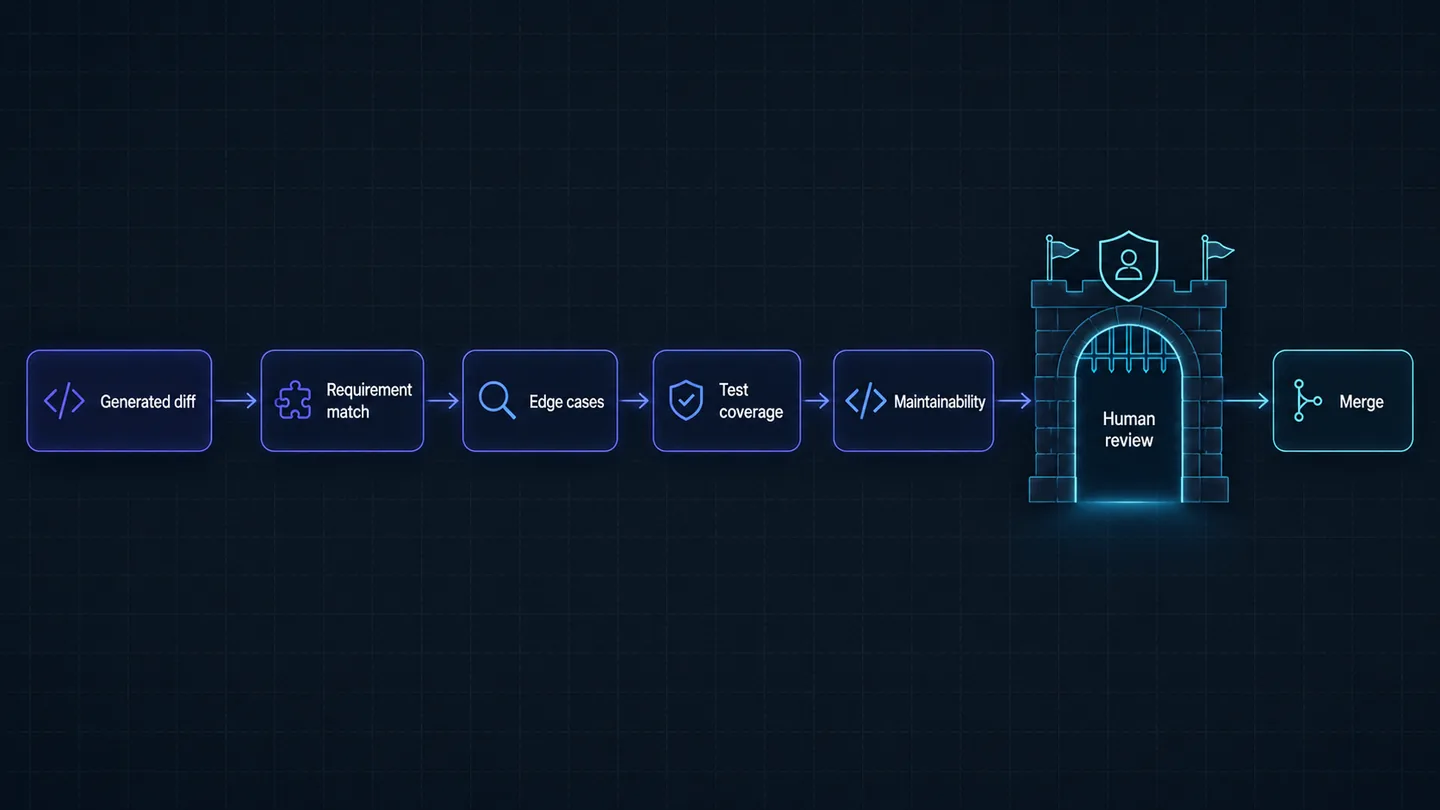
A useful review covers four layers. Requirement match comes first: did it solve the exact problem, or a nearby one? If the task was adding role checks to the right routes, make sure it didn't also lock out existing users. Correctness is next, meaning the edge cases and failure modes: invalid body, missing record, no permission, a failing dependency. Then test coverage. The question isn't whether there are tests but whether they'd catch a real regression or just restate the implementation. Maintainability comes last. Does the change fit the project's structure, or did it reinvent a helper that already exists and put logic in a route handler when the codebase keeps it in a service layer?
The biggest benefit is breaking confirmation bias. When the same agent writes the code and immediately declares it done, the workflow gets too trusting. A separate pass changes the job from "finish this" to "find what's wrong with this," and that turns up issues a quick victory lap would miss. Match the depth to the risk. A utility function gets a light pass, while auth, payments, permissions, migrations, and large refactors get a strict one. None of this replaces your own review. It just gives your review a sharper focus.
Review after implementation and before merge; scale the rigor to the blast radius of the change.
6. Frontend Design: make UI output less generic
Claude Code will happily produce a dashboard, a landing page, or a settings screen. The first version usually works and looks generic: uniform layout, random spacing, weak hierarchy, missing states. Adding decoration won't fix that. What helps is getting the model to treat UI as product work instead of code generation, which means thinking about hierarchy, density, typography, states, accessibility, responsiveness, and how a user actually moves through the screen.
A design skill makes it decide a few things before writing the final UI. Purpose: a dashboard, a pricing page, and a data table don't share a layout. Hierarchy: what should the eye catch first? States: loading, empty, error, disabled, and success, not just the happy path. Responsiveness: a layout that's fine on a wide desktop can fall apart on mobile. Ask for an activity dashboard without this and you get a grid of cards and a table. Ask with it and you get metrics grouped by priority, scannable columns, and the empty and loading states that make it work with real data instead of five rows of fixtures.
The most underrated part is knowing when not to invent. In a real project you rarely want a new style. You want the one you already have. The skill should push the model to reuse the components, spacing tokens, color variables, and interaction patterns already in the codebase. If the project uses Tailwind, shadcn/ui, or a custom library, it should inspect those components before creating new ones. It won't replace a designer or guess your brand from nothing, but give it references, tokens, and constraints and it starts from a much better place.
You won't need it for a backend service, a CLI, or a data pipeline. It pays off whenever the output is visual and user-facing: dashboards, admin panels, SaaS pages, onboarding flows, docs, demos.
Design the screen first (hierarchy, states, responsiveness, and the existing system), then generate the final UI.
Conclusion
Claude Code is already useful out of the box. The default workflow just isn't enough once the work gets larger, longer, or more important, because the weak points are predictable: it codes before it understands, long sessions get noisy, new sessions start cold, clean diffs hide gaps, and UI comes out generic. Each of these six skills targets one of those failure modes directly, which is the point. A skill should have a job. If the model keeps rushing, add planning. If sessions get messy, add context management. If every session starts from zero, add memory. If diffs go straight to merge, add review.
Piling on more skills won't make the workflow better, and too many overlapping ones just make the setup harder to reason about. Start with the skill that solves the problem you have right now, use it on real work, and improve it over time. For me, the bigger change was moving away from one-off prompting and toward deciding how I want the work to happen: how the model plans, what it remembers, how it reviews, and what "done" actually means.